1
Download the App
Download or update American Mahjong Practice from the App Store to get the latest version with 2026 hands.

Purchase 2026 Hands
2
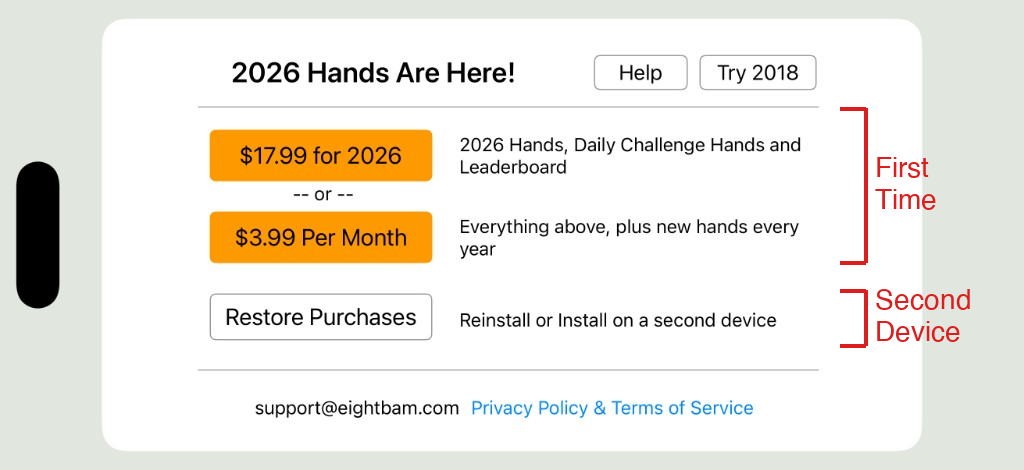
Open the app and choose one of the purchase options below:
- $17.99 one-time — 2026 Hands, Daily Challenge Hands, and Leaderboard. Does not renew automatically.
- $3.99/month — Everything above, plus new hands every year
- Restore Purchases — Reinstall or install on a second device
3
Switch to 2026
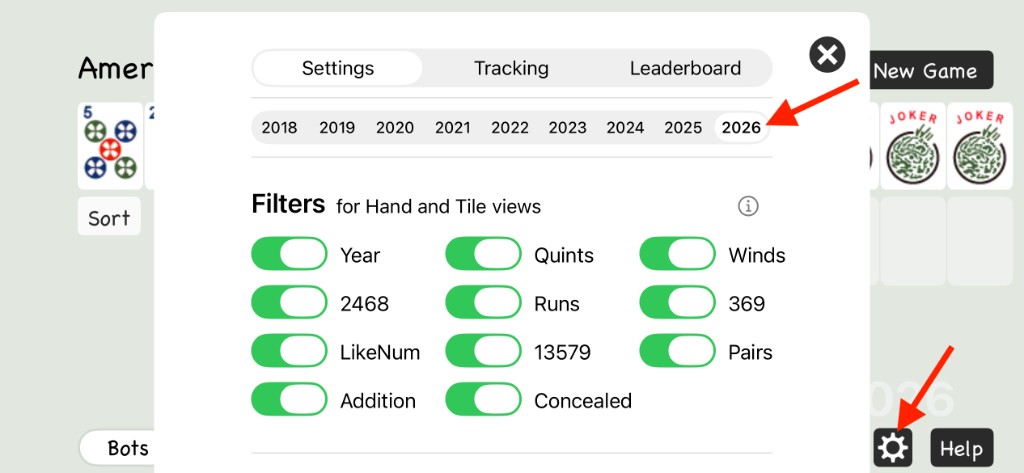
After purchasing, switch to the 2026 card:
- Tap the Gear icon at the bottom-right of the screen
- In the Settings menu, tap the 2026 year tab at the top
- Close Settings and start playing with the new 2026 hands
iPad
Installing on iPad or a Second Device
Follow the same 3 steps above. Make sure you are logged in with the same Apple ID used for the original purchase. When you reach Step 2, tap Restore Purchases instead of buying again. This will restore your existing purchase at no additional cost.
Mac
Playing on a Mac
On a Mac with Apple silicon (M1 or later), the app runs natively. Follow the same 3 steps above using the same App Store link to download, purchase, and switch to 2026.